

Microsoft Security Essentials is an anti-malware tool that can be installed for free on older versions of Windows, namely Windows Vista and Windows 7. The technical support for Windows XP is, unfortunately, no longer available. In newer versions, Windows Defender is used instead.
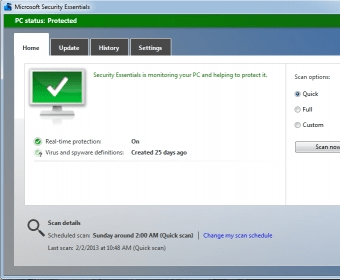
Security Essentials is easy to use. The user interface is fairly simple and offers most features right on the main window. Here you can scan your computer and choose among a quick, full or custom scan. Quick Scan checks specific parts of your computer, for example, OS drive, System Files, Registries. Full scan is a deep scan of your entire computer. The custom scan can be used to scan files or drives of your choice.
At the bottom of the main window, you can see the next scheduled scan and the last scan details. The window interface is color coded: green means everything is alright and you are well protected, yellow means there is some problem (either no scan performed or an update required) and red means virus or spyware are detected and you need to take some actions. Microsoft Security Essentials will alert you automatically in case of a yellow or red alert and recommend what to do. You can act directly from the notification area without having to enter the application.
Virus and spyware definitions are updated automatically and the details can be seen in the Update tab. The History tab shows detected virus/spyware, quarantined files and allowed files (in case of false positives). Security Essentials also displays the alert level of the virus/spyware, i.e how dangerous the suspicious file is to your system. In the Settings tab, you can configure your scans, set files to scan and exclude, select processes to scan, configure the default action for virus/spyware, create a system restore point and set Administrator option. The real-time scan is turned on by default and is useful for users who use external storages and the Internet. MAPS or Microsoft Active Protection Service automatically reports on all detected virus/spyware and suspicious software to Microsoft which helps in developing better update definitions.
Unlike other anti-malware applications, Microsoft Security Essentials doesn't use much of your system resources, is fast and simple. It is also free and only requires a licensed copy of Windows. I have used it for a long time and haven’t had any issues with virus/spyware. I recommend using it for personal computers and small businesses.






Comments (53)